- DATE:
- AUTHOR:
- The Avidon Health team
A New Dashboard, New Reports, and a New Experience
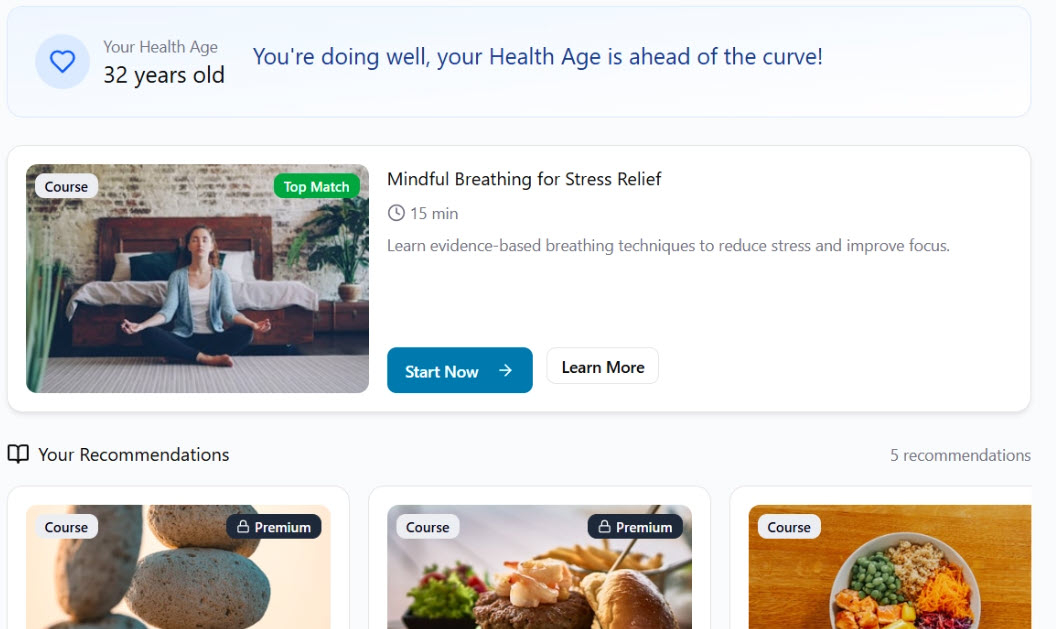
This release's centerpiece is a reimagined member dashboard that surfaces the right content for each person based on their health profile and activity history. Alongside it: a rebuilt participant experience for Challenges, Habit Builders, and Group Programs that guides members from sign-up through completion, and a new reporting suite that turns engagement data into something you can do something with. Continued progress on Page Builder v2 and the Personalized Recommendations Engine round out the release.
A Dashboard that Serves Each and Every Member
We’ve redesigned the member dashboard to deliver a more personalized, engaging, and action-oriented experience. By combining Health Age Predictor (HAP) insights, keyword-driven content alignment, and real-time progress tracking, the new dashboard helps guide each member toward their next best step, making it easier to stay engaged, build healthy habits, and make steady progress over time.
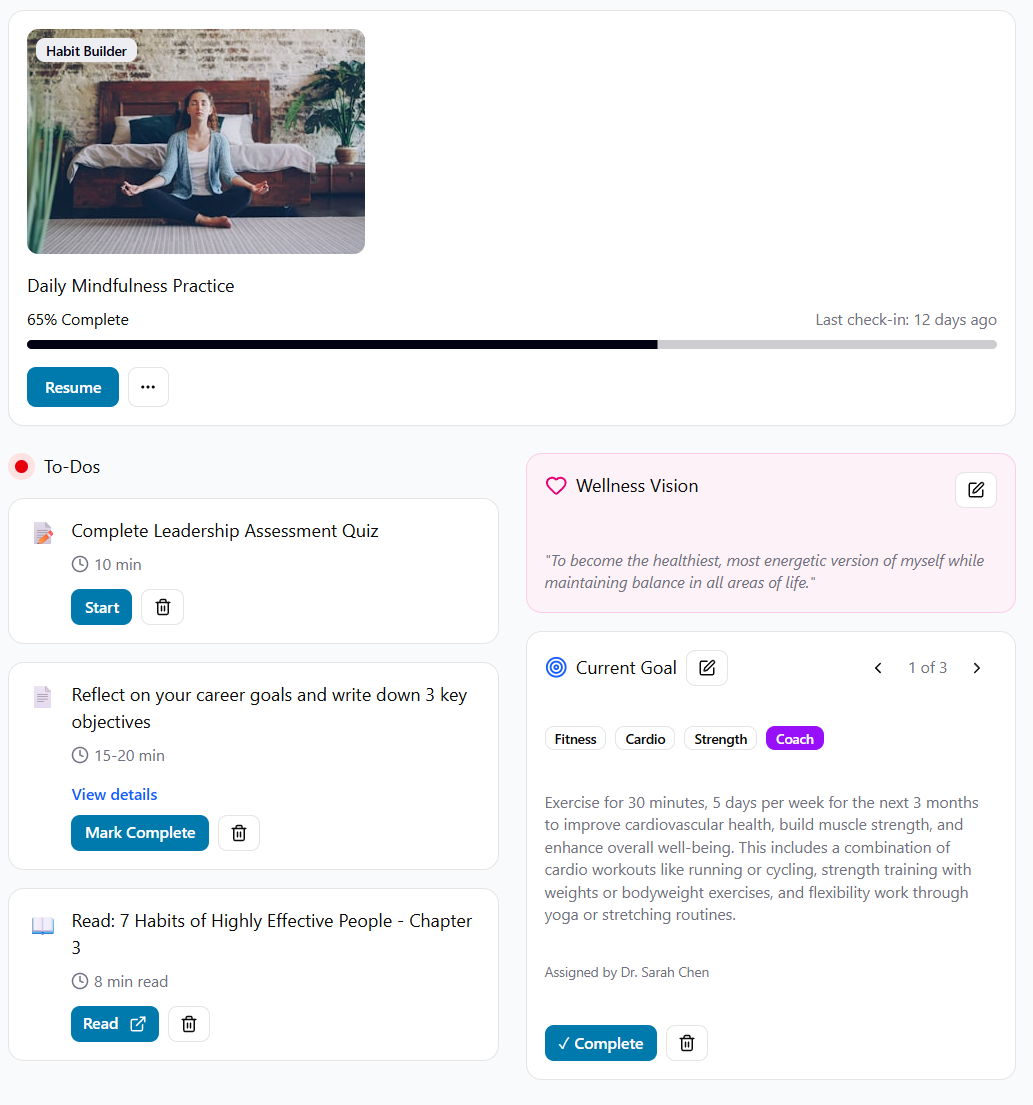
Members will now see in-progress activities like courses, habit builders, challenges, and goals surfaced more prominently, along with dynamic recommendations tailored to their health profile, goals, and past activity. The experience also introduces timely nudges, progress cues, and milestone moments to reinforce momentum and encourage continued participation.
This updated framework sets the foundation for more advanced personalization, including future coaching integrations, while also creating space to highlight seasonal programs and client-led wellness campaigns, all within a single, unified experience.
In-Progress Activity, Front and Center Whatever a member is actively working on—a course mid-way through, a habit builder in Phase 2, a challenge with two days left—shows up prominently so they can pick up exactly where they left off, eliminating any thoughts of "what was I doing?"
Progress Cues, Milestone Celebrations, and Notifications The new dashboard integrates notifications, progress indicators, and milestone moments to keep engagement from fading between logins. Members see where they stand and what's worth celebrating.
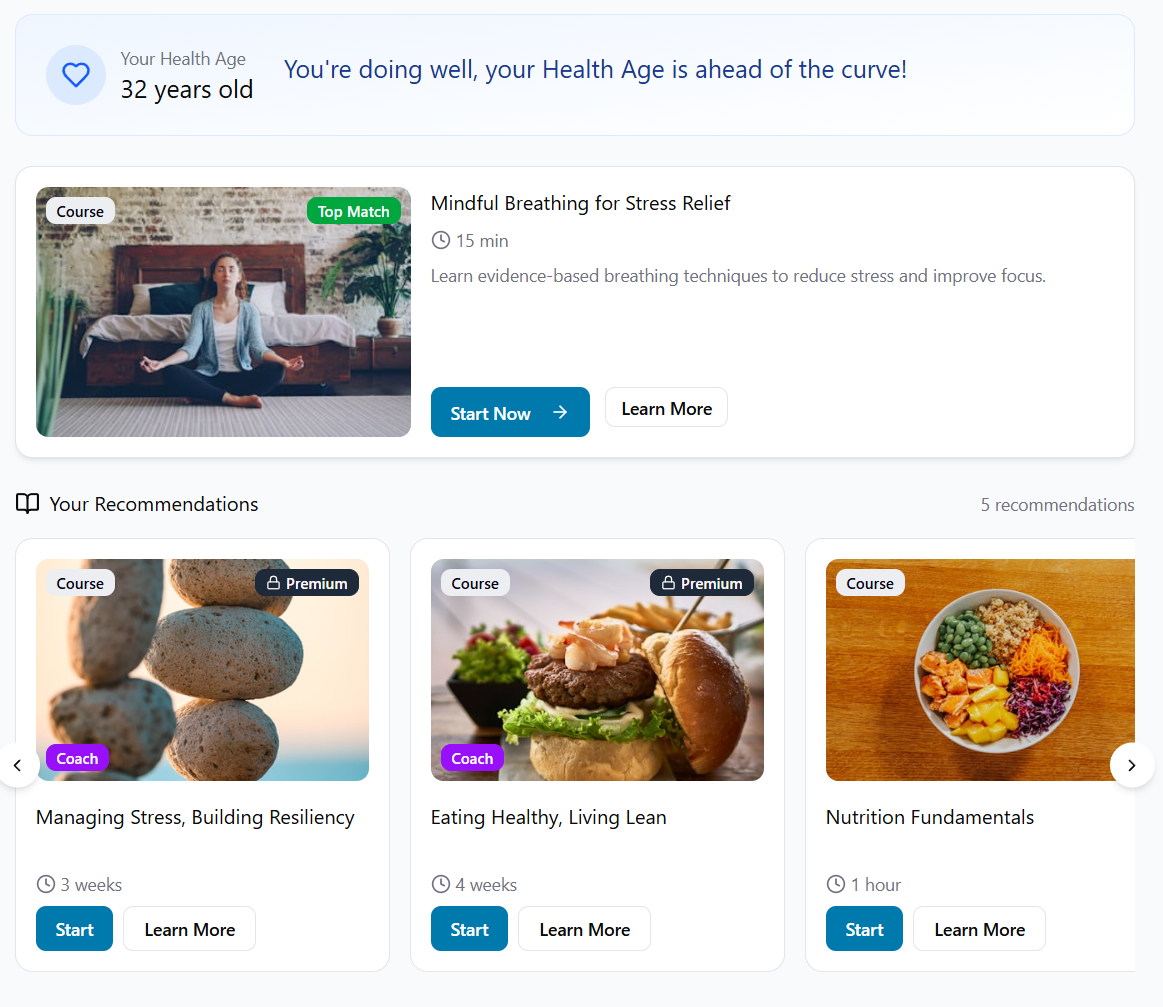
Personalized Recommendations
Focused In-Progress Activities
What This Does for You and Your Members
Engagement that doesn't require you to push it—Personalized recommendations and in-progress visibility bring members back on their own.
The platform does the connecting—For instance, members with high-stress HAP responses get stress management content; members mid-course get nudged back in.
Room for client-driven campaigns—Dedicated space for monthly challenges and health campaigns means the things you want members to notice don't compete for attention with everything else.
Setting the foundation for what's next—The new dashboard framework is built to incorporate coach-assigned tasks and direct coach communication down the road, so what you're getting now is already the long-term infrastructure.
A Note on Rollout: The new dashboard applies automatically for portals using the default member dashboard without a custom CTA tile. Portals with a custom member dashboard or a custom CTA tile will remain as-is.
The Program Experience, Built for the Way Members Actually Engage
Challenges, Habit Builders, and Group Programs have a completely new participant interface. It's unified, phase-aware, and designed so that at any moment—before the program, during it, after it—members always see exactly the right thing.
A Look at What's Changing,,,
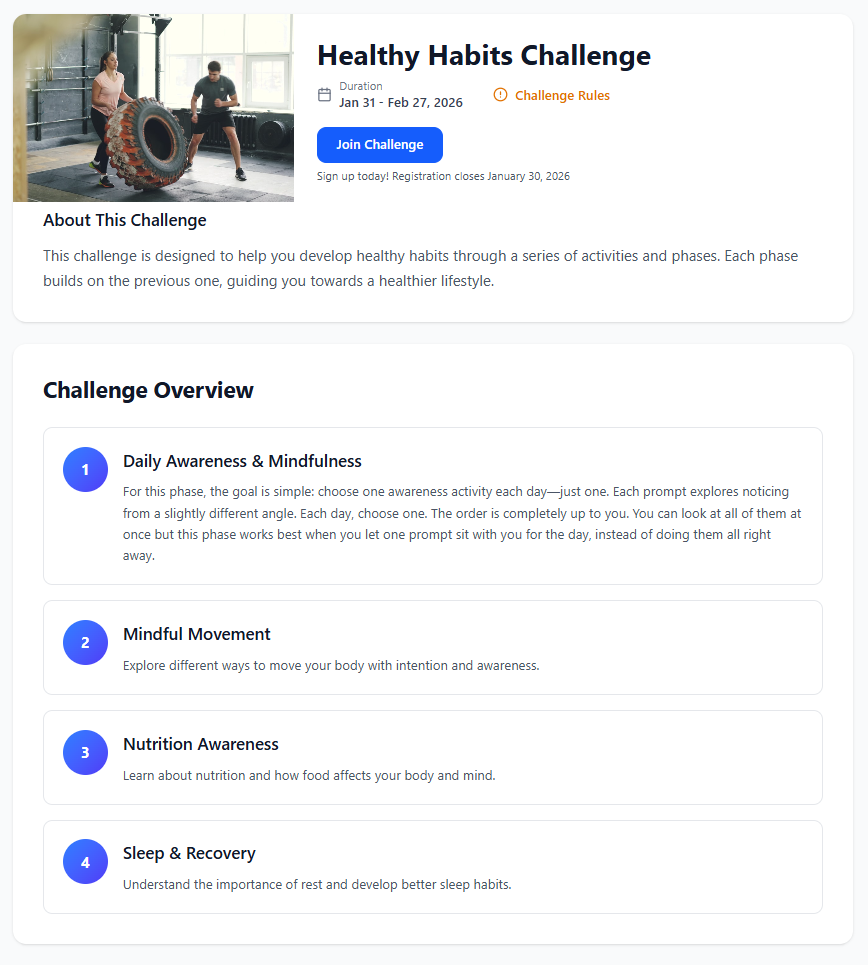
Three Lifecycle Experiences: Overview, My Progress, Completion: Before a program begins, members land on a rich Overview page with the program description, timeline, rules, and a phase-by-phase preview of what's ahead. Once it's live, the interface transitions to My Progress automatically. When it's over, the Completion screen takes the spotlight with results and recognition. The right interface appears at the right moment without manual toggling or confusion.
Smart Registration Flow: The Overview page adapts in real time to registration state. Before registration opens: a "Registration Opens Soon" badge with the date. When open: a single-tap Join button. After joining displays a confirmation with a countdown to the start date. Members know exactly where they stand and what's next before they've committed to anything.
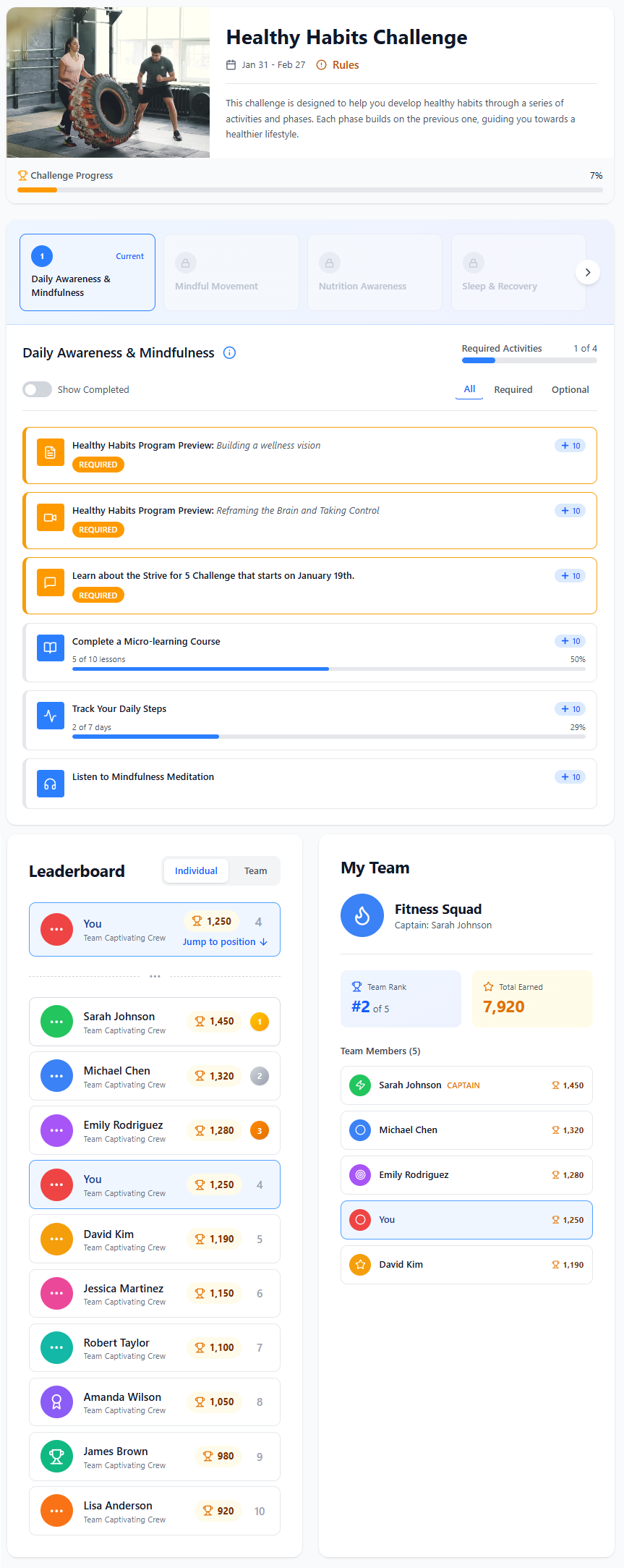
Phase-Based Navigation and Activity Tiles A scrollable phase carousel sits at the top of My Progress, showing each phase's status at a glance—completed, current, available, or upcoming. Selecting a phase reveals its activities, each displayed as a structured tile with type, title, description, point value, and a required/optional indicator. Required activities get an amber "REQUIRED" badge so there's no ambiguity. Multi-day activities show an inline progress bar. Members can filter by All, Required, or Optional, and hide completed activities to focus on what's left.
Individual and Team Leaderboards A dual-mode leaderboard covers both individual and team rankings. The current member's position is pinned at the top with a "Jump to Position" link. Top-three finishers get gold, silver, and bronze recognition. Team members see a dedicated panel showing team rank, total points, captain, and full roster with individual scores alongside the main leaderboard.
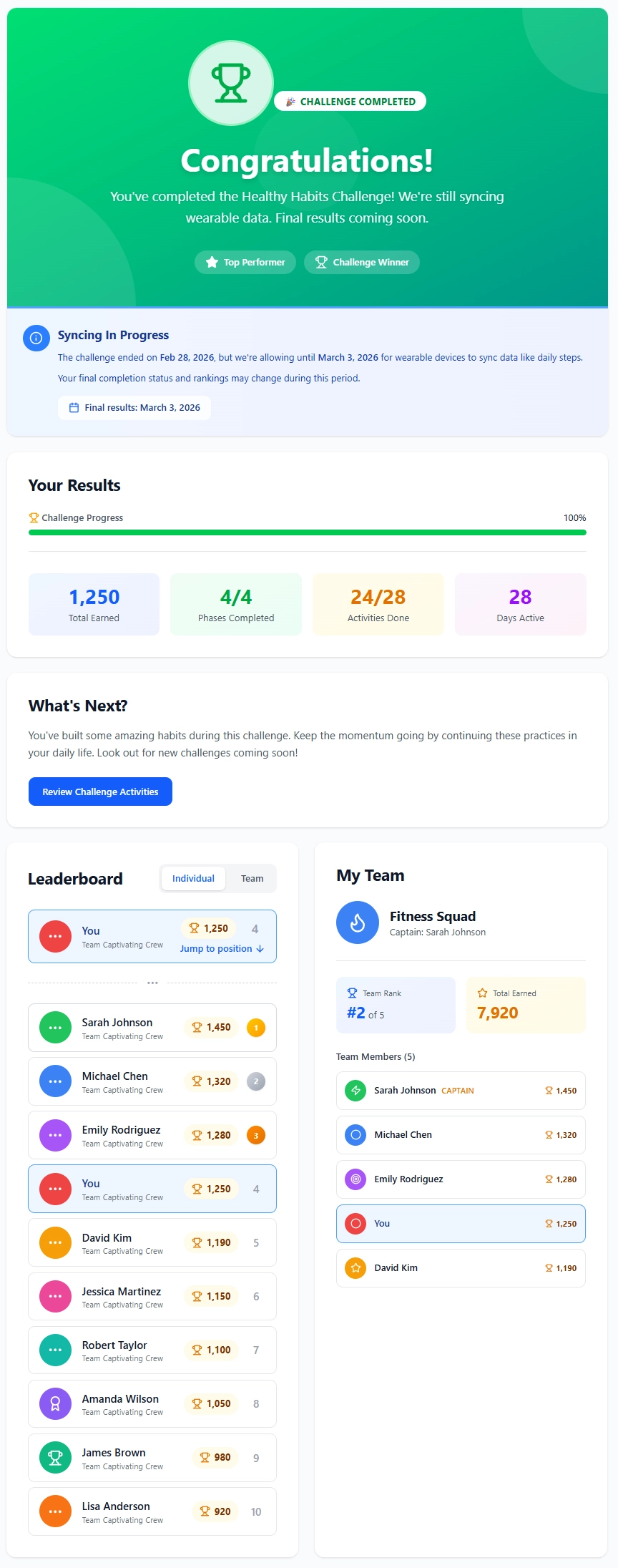
Completion Screen with Grace Period Awareness: After a program ends, members see a full-width hero card—congratulatory for those who finished, informational for those who didn't—with a summary of total points, phases completed, activities done, and days active. When a data sync grace period is active (wearable step data, for example), a notice explains that rankings may still shift and shows the final results date. Milestone badges like "Top Performer" and "Challenge Winner" appear for members who earned them.
Why It Matters, in a Nutshell
Guided Experience, Not a Blank Canvas—Members always see the right interface for the right moment; there's no guesswork about where to go or what to do next. That clarity is what keeps people in programs instead of dropping off.
Clarity on What's Required—Required vs. optional activity labeling, amber badging, and dedicated filters make completion expectations obvious; that means fewer "what do I need to do?" questions coming from participants.
Motivation Built Into the Structure—Leaderboards, team panels, phase-completion moments, and achievement badges create multiple reasons to come back throughout the program.
Consistent Across Every Device, Responsive Everywhere: Every component is built responsive-first. The same experience works on desktop and in the mobile app's web view—same functionality, same layout logic, optimized for the device.
One Experience, Three Program Types—The same interface powers Challenges, Habit Builders, and Group Programs; improvements to one benefit all three simultaneously.
Reporting That Tells You What Happened and What to Do About It
Along with the major updates to the experience members will have, Challenges, Habit Builders, and Group Programs now have dedicated reporting dashboards. Not a data export, not a raw table, but a four-tab dashboard built for the way managers actually evaluate what's working.
What's New
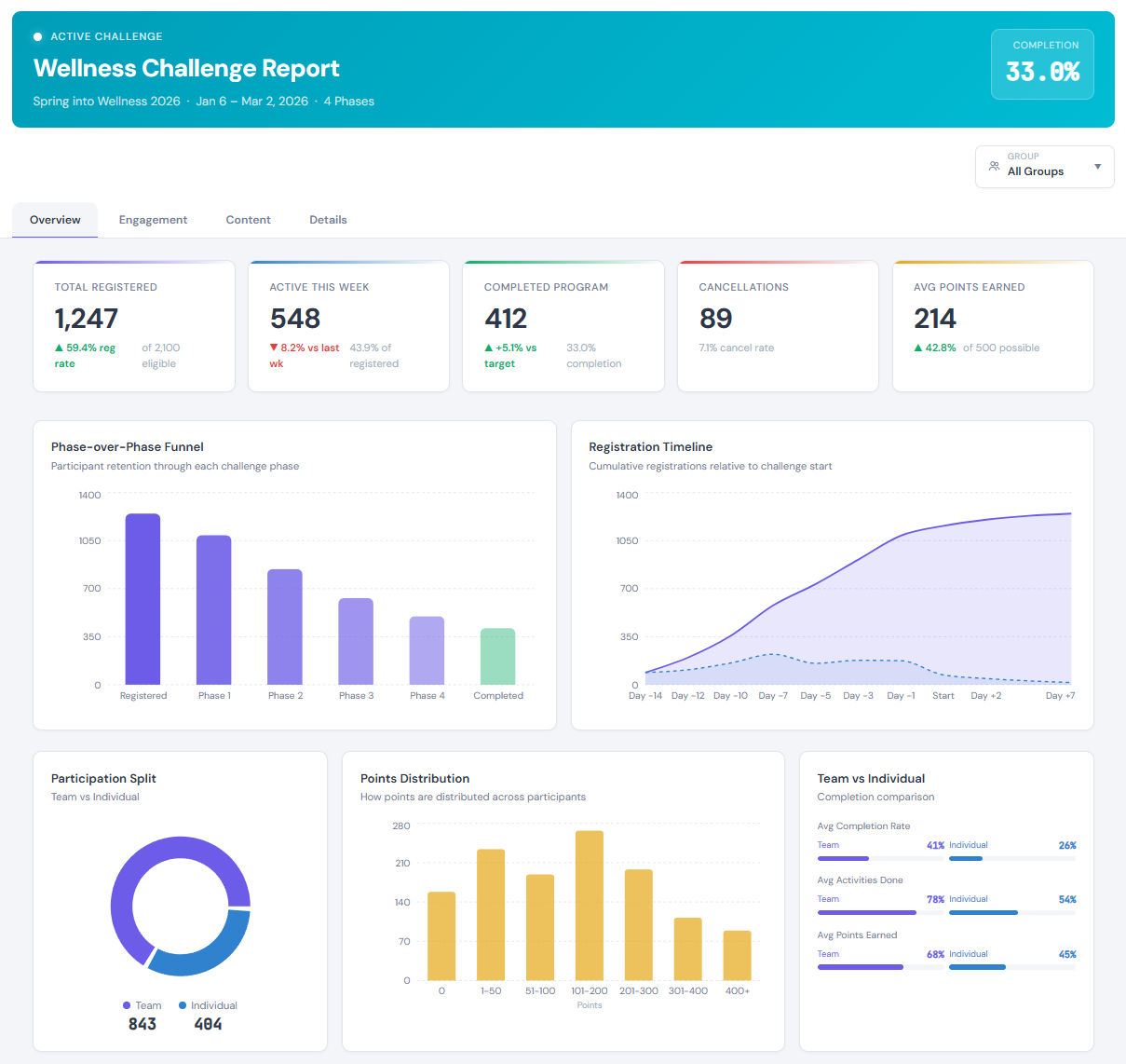
Overview: KPIs and Retention Funnel at a Glance: The dashboard opens with five metric cards—Total Registered, Active This Week, Completed Program, Cancellations, and Avg Points Earned—calculated in real time against the registered population. Below the metrics: a phase-over-phase retention funnel that shows exactly where participants drop off, a registration timeline, and a points distribution histogram. For programs with both team and individual participation, a participation split chart and team-vs-individual performance comparison appear automatically.
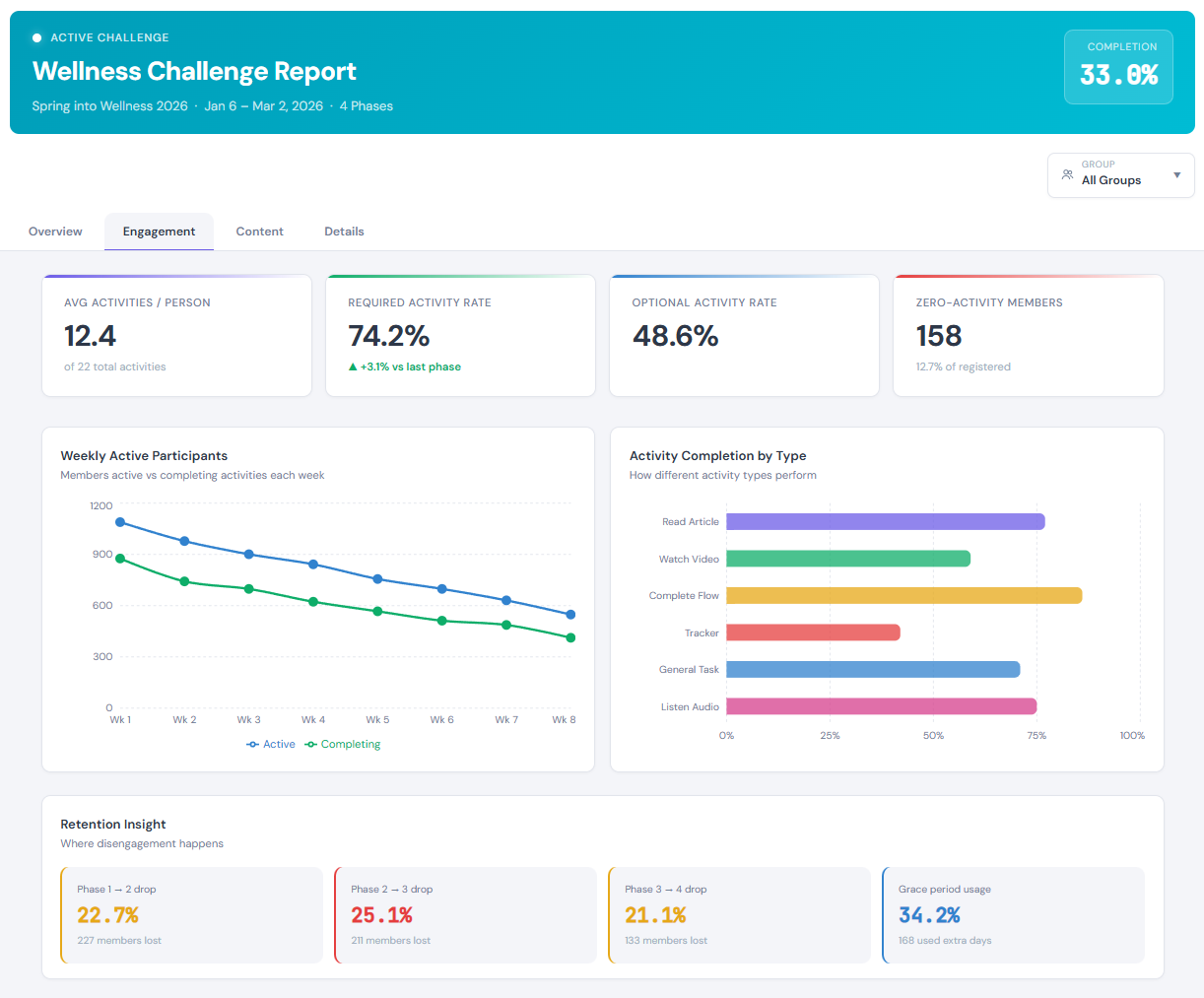
Engagement Analytics: Active vs. Actually Engaged: The Engagement tab tracks participation trends over the life of the program, with two lines: members who logged in vs. members who completed at least one activity. That distinction matters; it's the difference between passive logins and meaningful engagement. Completion rates by activity type and a retention insight panel that flags the exact phase transitions where drop-off happens round out this tab.
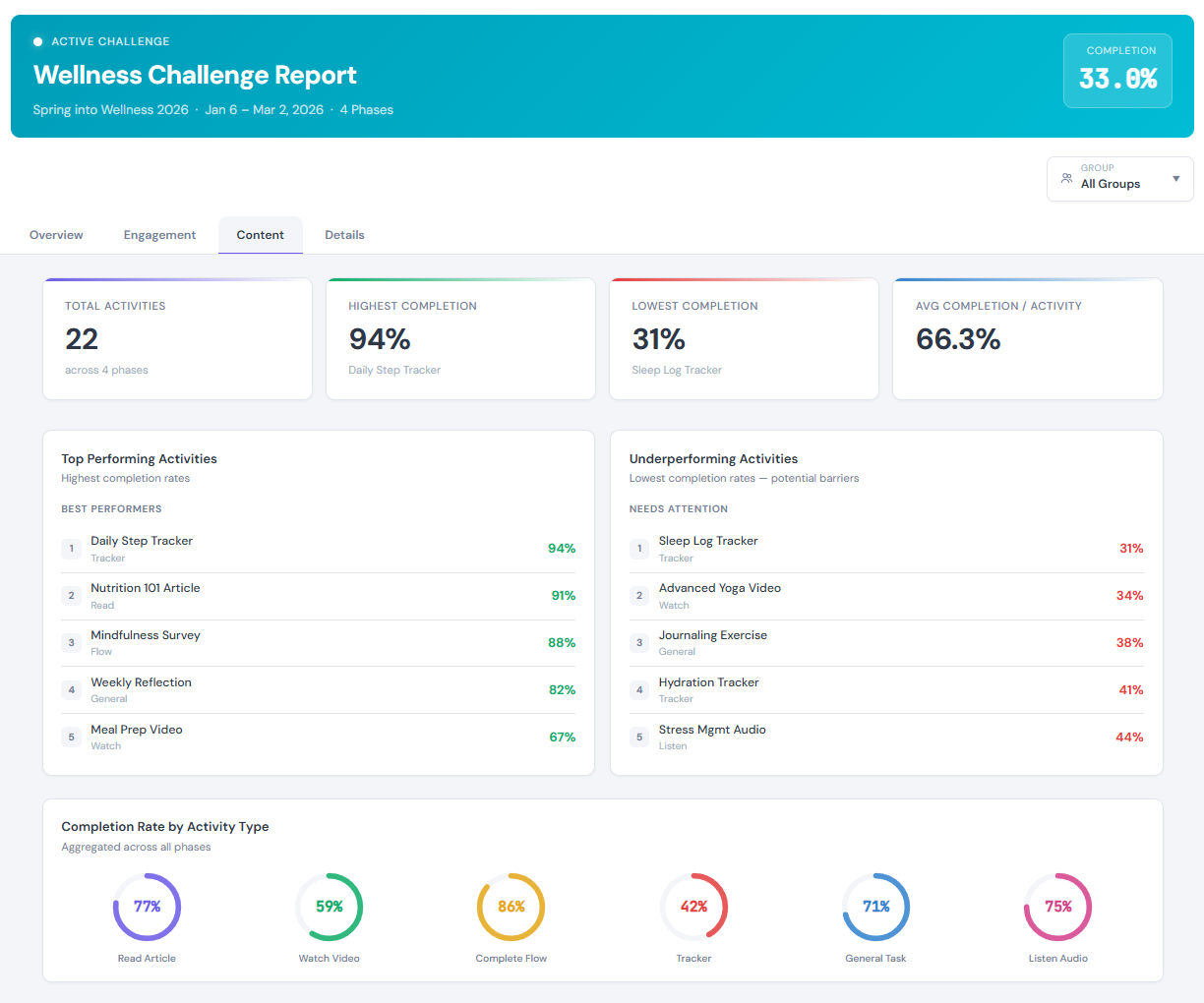
Content Performance: Which Activities Are Working: The Content tab answers a direct question: which activities are landing and which aren't? Top and bottom performers by completion rate, ranked tables of the five highest and five lowest performing activities, and circular gauges breaking down completion by content type—articles, videos, flows, trackers, audio—give you a clear picture of what's resonating.
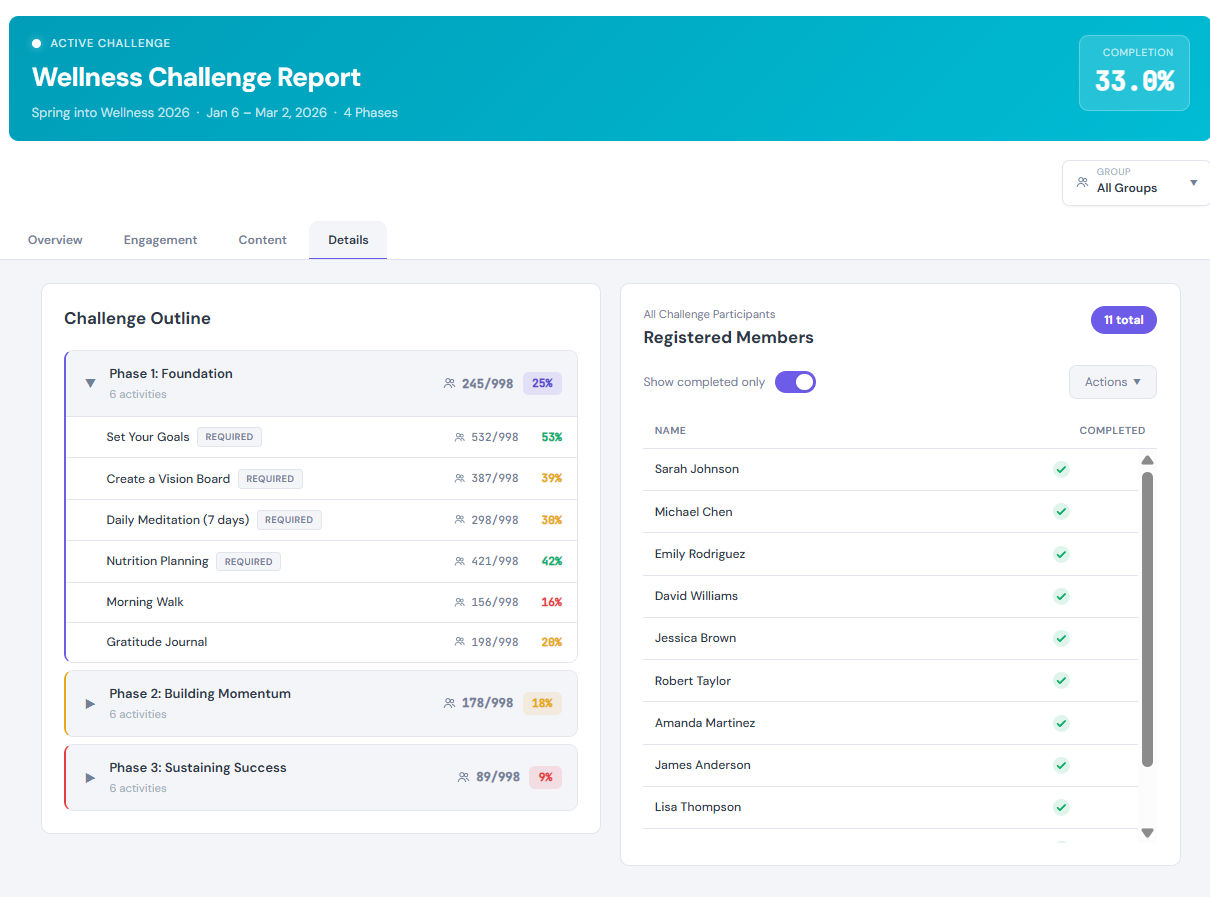
Details Drill-Down: From Insight to Action in One Screen: The Details tab is where data becomes action. The left panel shows the full program structure: phases and activities with completion counts and color-coded progress. Clicking any phase or activity filters the right-side participant list to show exactly who completed (or didn't complete) that item. From the filtered list, you can send an email, send an SMS, or export, all without leaving the report.
Group Filtering Across the Entire Report: A report-wide Group filter lets you slice every KPI, chart, and participant list by portal group. When a group is selected, the entire report recalculates (including the header completion badge) to reflect only that population. Comparing departments, locations, or cohorts is now a single click.
Adapts to the Program: The report automatically adjusts to what it's displaying. Single-phase programs simplify the funnel. Programs without points hide point-related metrics. Individual-only programs suppress team comparisons. On-Demand programs render timelines relative to each member's start date. Every view shows what's relevant and filters out what is not.
Here's the Payoff, Simply Put...
Faster Program Evaluation—HR Managers and program managers can assess challenge health, identify engagement problems, and spot high- and low-performing content without building custom reports or exporting raw data; the answers are already on the screen, in the report.
Turn Insights into Action Without Leaving the Report—Find members who dropped off at Phase 2, filter to that exact list, and send a targeted re-engagement message, all in one workflow. That's the difference between a mere report and a tool.
Apples-to-Apples Comparisons—Group filtering ensures you're comparing the right populations when evaluating outcomes across departments, locations, or cohorts; no more mental math to account for different group sizes or participation rates.
Metrics That Mean Something—Because the report adapts to each program's configuration, every metric is contextually accurate; there are no confusing zeroes where a feature simply isn't in use.
Also in This Release...
Page Builder v2, Continuing to Take Shape
We've continued refining Page Builder v2 after the effort began in the first quarter. This release we've completed the new version of our Page Builder, bringing a more modern, mobile-first layout optimized for how members actually browse, along with new recommendation components—a Primary Focus Selector card, Top Match card and a Recommendations Carousel—that surface the right content at the right moment. Core engagement tiles (To-Do, Goals, Vision, Primary Focus) have also been redesigned for better clarity and consistency, with more upgraded tiles coming in the months ahead.
Personalized Recommendations Engine: Now Live
The Recommendations Engine is here. Admins define rule-based logic — drawing on HAP responses, demographics, group membership, and more — to surface personalized content for members across courses, challenges, flows, and resources. Rules are prioritized, weighted, date-ranged, and auditable. The Top Match and Recommendations Carousel components bring those recommendations directly to the member dashboard. Recommendations can be triggered by system rules, manual admin assignment, or automation workflows; each moves through a full status lifecycle for reporting and attribution.
Coming Up in the Challenge Autopilot: Steady the Ship—A Mental Health Challenge
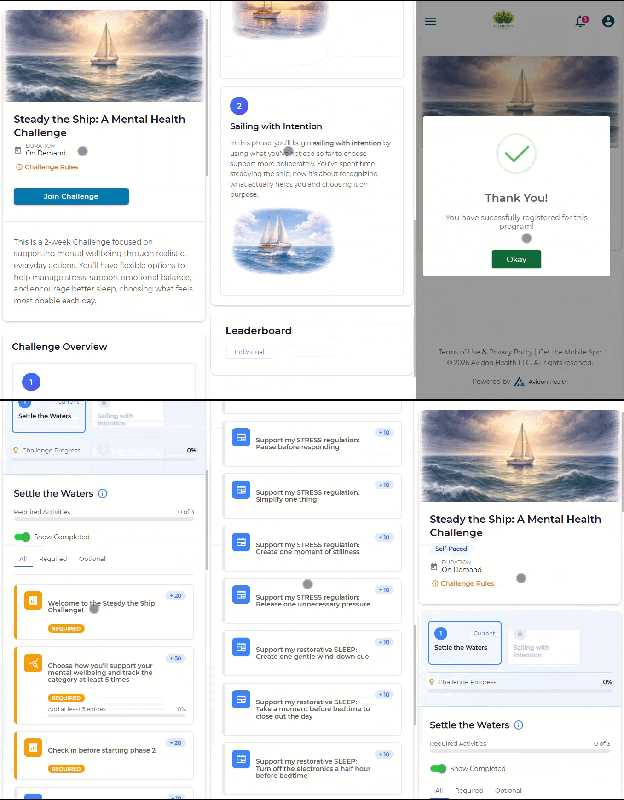
May's Autopilot Challenge is Steady the Ship: A Mental Health Challenge, timed in support of Mental Health Awareness Month. The Challenge centers on stress reduction, emotional resilience, and the role of sleep in overall mental wellbeing. This Challenge is all about choice, providing a range of prompts that are practical, accessible activities designed to help participants manage daily stressors and strengthen emotional regulation.
Registration opens April 27. The challenge begins May 4.
Communication is Key
Read the full article in the Product Communication Center, where you can also submit your thoughts and ideas.
If you want to learn more about Avidon Health, please visit our website. Want to reach out to our team of experts? Click here for our helpdesk.