- DATE:
- AUTHOR:
- The Avidon Health team

Member Admin Notes: Rebuilt for Big UX/UI Improvements
This release centers on an upgrade to the Notes experience in the Member Admin; there's a redesigned layout, a flyout editor, and filtering and search tools that make a long note history more navigable. Alongside that, coaches now see a clear, actionable alert only when their live connection actually needs attention. As usual, new Autopilot Challenges are continuing to roll out: June's Everyday Brain Health Challenge is live and ready for your members, with July's SunSmart Summer Challenge queued up right behind it. And a small but useful admin capability is here: the ability to update member key fields directly from the Details section of the Member Admin.
The Notes Experience, Redesigned
The Notes section in Member Admin has been rebuilt, now featuring a cleaner layout, a smarter editor, and three ways to filter a long note history without scrolling through the whole thing. This sets the stage to support document attachments to notes coming soon.
What's New
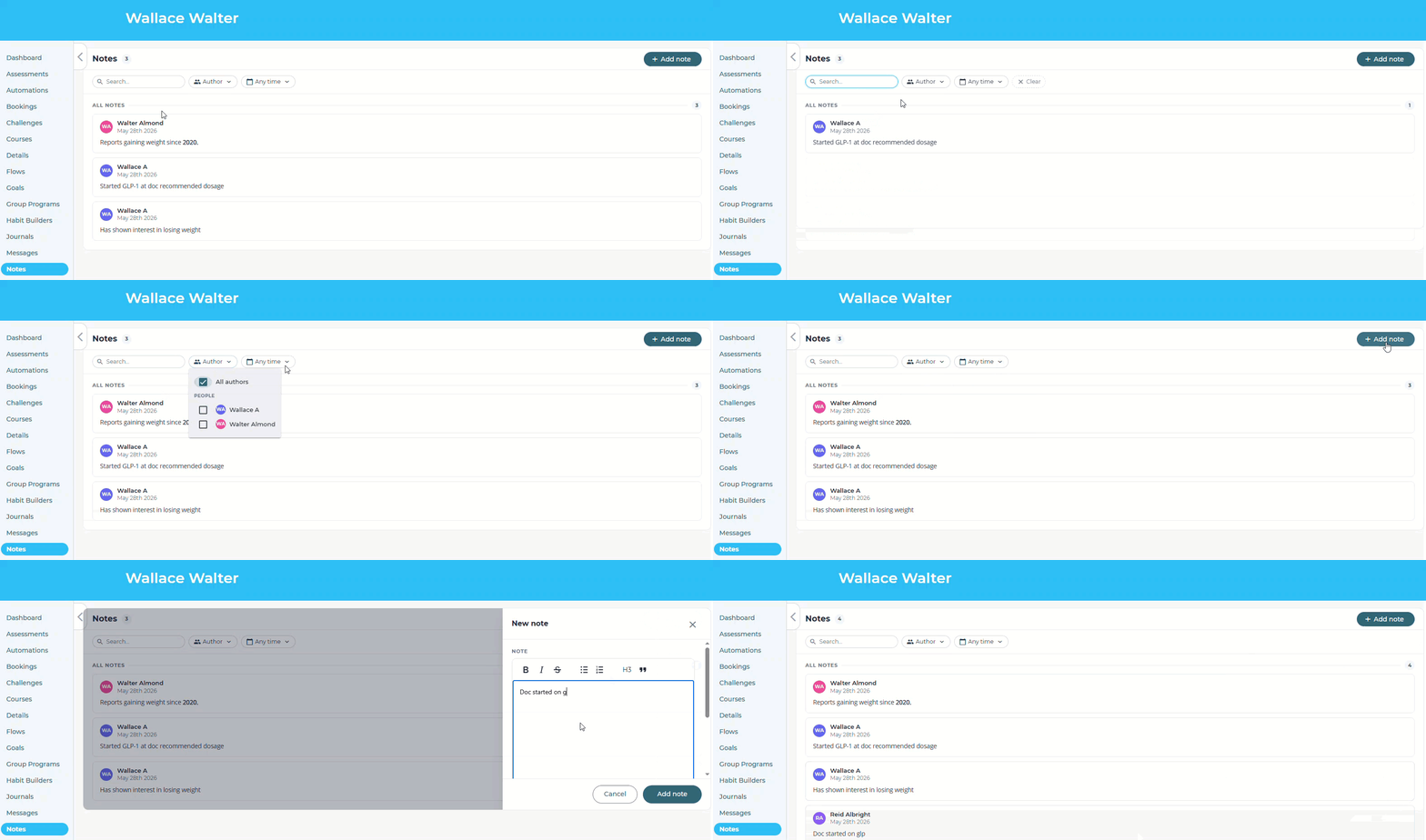
Modernized Layout and Flyout Editor The new editor opens as a flyout from the right side of the screen, keeping the member record in view while you write. Formatting options are practical and uncluttered: bold, italics, strikethrough, numbered lists, bullet lists, H3 headings, and blockquote.
Filter by Author, Date, or Text Search The search bar queries note body text directly; the author filter is scoped to people who've actually written on that specific record; and the date filter offers five preset ranges: any time, last 7 days, 30 days, 90 days, and 12 months.
Why It Matters, in a Nutshell
Less time hunting, more time acting—finding a specific note used to mean scrolling and visually scanning; the search bar, author filter, and date presets change that entirely.
Cleaner documentation for reporting—a searchable, filterable note history makes it easier to pull meaningful context for member updates or handoffs.
Multi-staff accounts are easier to work with—the author filter changes how teams with multiple staff touching a record collaborate and keep tabs on activity.
Clearer Connection Alerts for Coaches
Coaches in the admin previously saw a persistent connection status indicator in the header—"Connected," "Reconnecting…," or "Disconnected"—that didn't communicate what was actually at stake or what to do about it. This update replaces that with a smarter, more informative, and selective approach.
What's New
The Persistent "Connected" Indicator Is Gone When the coaching connection is working normally, the header says nothing about it. A working connection doesn't announce itself.
A Banner Appears When It's Needed If the connection drops and doesn't recover on its own quickly (within 15 seconds), a slim banner appears below the site header—visible across all admin pages—with a plain-language message: live updates are paused, and new messages and tasks may be delayed. Coaches get two options directly from the banner: retry the connection or refresh the page as a fallback. The banner dismisses automatically once the connection is restored; a brief toast message confirms the return.
Secondary Context on the Coaching Dashboard An inline callout on the Coaching dashboard mirrors the header banner when the connection is degraded, so coaches working in that view don't have to look up to catch the warning.
Why It Matters, in a Nutshell
Coaches no longer see a technical status indicator unless it is telling them something useful
When something genuinely needs attention, the message is clear: live updates are paused, here's what to do
Brief network hiccups don't trigger a false alarm
The warning follows coaches across the entire admin, not just the Coaching dashboard
Your June and July Autopilot Challenges
Two challenges are queued up and ready to run this summer—no setup required for all portals who have Autopilot enabled.
Everyday Brain Health — June Registration opens May 25 | Challenge begins June 1
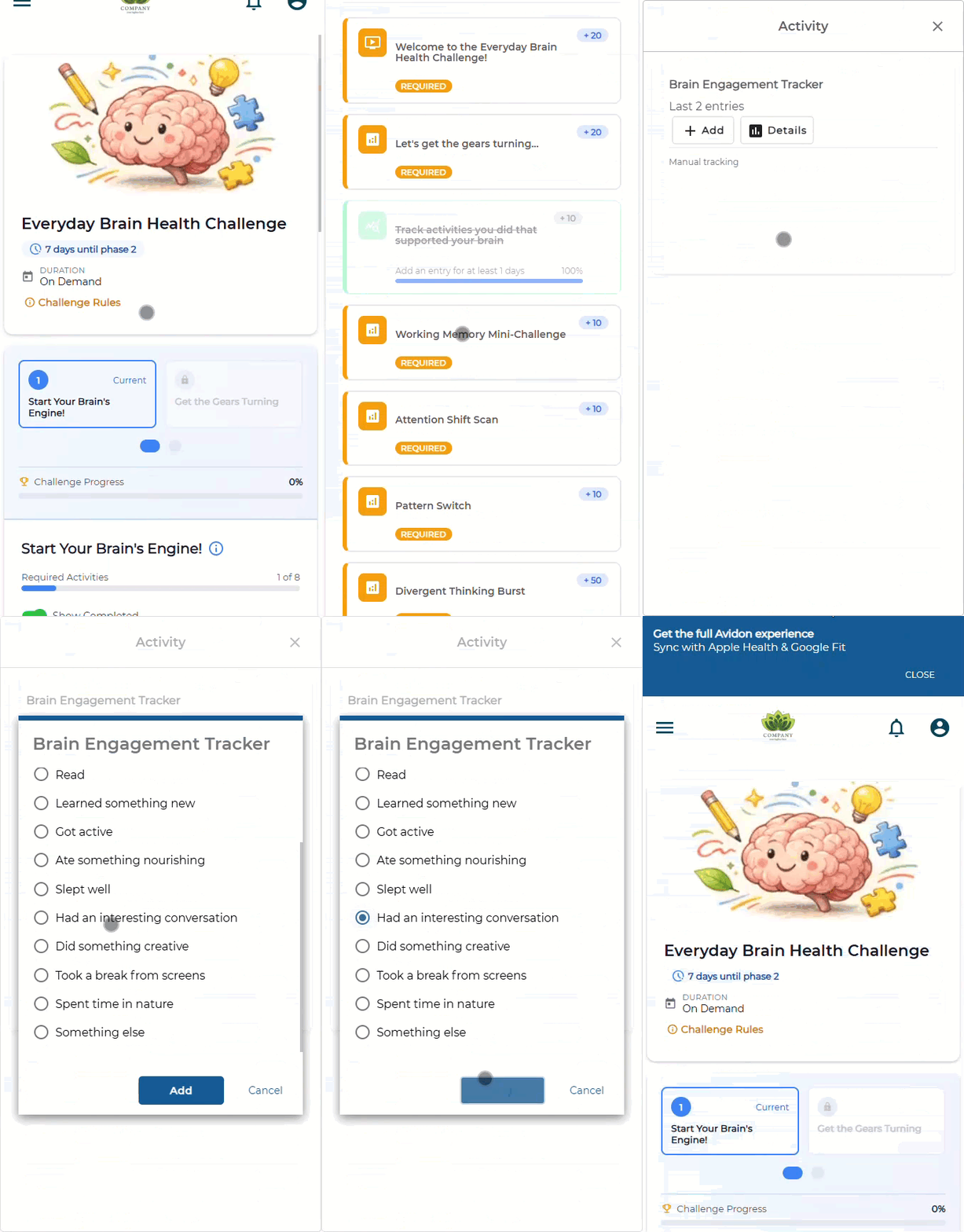
The Everyday Brain Health Challenge is a two-week experience that reframes brain health as something participants are already doing — through fun novelty, and mental engagement. Rather than treating the brain as a performance metric to optimize, this Challenge approaches it as a collaborator to get to know. Week 1 introduces brain engagement through curiosity-driven activities; Week 2 shifts to intentional repetition of whatever participants noticed worked best for them.
The SunSmart Summer Challenge — July Registration opens June 29 | Challenge begins July 6
The SunSmart Summer Challenge is a short, seven-day experience designed to help participants stop relying on willpower and start relying on systems — focusing on cue installation and friction reduction so that summer self-care becomes more automatic and less forgettable.
Editable Key Fields in Member Admin
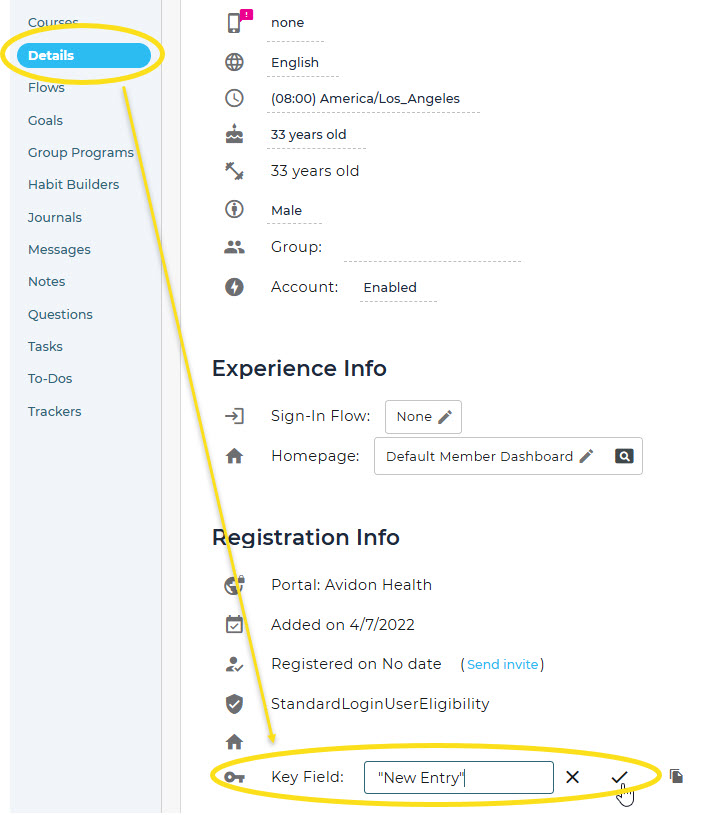
Admins can now update a member's key field directly in Member Admin—no help desk ticket required.
Communication is Key
Read the full article in the Product Communication Center, where you can also submit your thoughts and ideas.
If you want to learn more about Avidon Health, please visit our website. Want to reach out to our team of experts? Click here for our helpdesk.