- DATE:
- AUTHOR:
- The Avidon Health team
SMS Confirmations, Courses in Programs, and the 2027 Challenge Lineup
With this release, every member who opts in to SMS now gets the carrier-required confirmation automatically, which keeps your text channel open and deliverable. Courses join the program lineup as a trackable activity, Managing Stress & Building Resiliency gets a fully modernized video experience, and October's Autumn Movements & Moments Challenge has just begun. Plus, the 2027 Challenge Autopilot calendar is set.
Your Texts, Cleared for Delivery
Before carriers will deliver a single text, they want a proper introduction. US mobile carriers and the CTIA require every member who agrees to text messages to get an immediate confirmation. It has to say who's texting, that message frequency varies, that message and data rates may apply, and how to get help or stop. Starting with this update, that confirmation goes out automatically, before any other message reaches the member's phone. It's a short text with a big job: it's a condition of our provider's A2P 10DLC campaign approval, and it keeps carriers from filtering or blocking our SMS traffic.
What's New
The Confirmation Itself—the moment a member opts in, they receive:
"Avidon: You are subscribed to Coach Messages. Msg frequency varies. Msg & data rates may apply. Reply HELP for help, STOP to cancel."
That one message covers everything carriers ask for: who's sending, how often, rate disclosure, and how to get help or opt out.
One Opt-In, One Message
The confirmation fires only when a member's SMS status switches from off to on. Re-saving preferences with SMS already on won't send a second one, and neither will a request that gets redelivered through the queue.
Coach Threads Stay Clean
The confirmation doesn't appear in coach message threads in the admin portal.
Why It Matters, in a Nutshell
Deliverable texts—Carriers require this confirmation before they'll deliver a business's texts, so sending it automatically protects every reminder, nudge, and coach message that comes after it.
Compliance on autopilot—Every opt-in triggers the required message, so nobody has to remember to send it.
Nothing to set up—It's a platform-level change with nothing for admins to configure or announce, whether you manage one population or fifty.
Clean coach history—The confirmation stays out of coach threads, so the conversations coaches and admins review stay focused.
One small text keeps your whole SMS channel open, and this update makes sure it always goes out.
Courses Join the Program Lineup
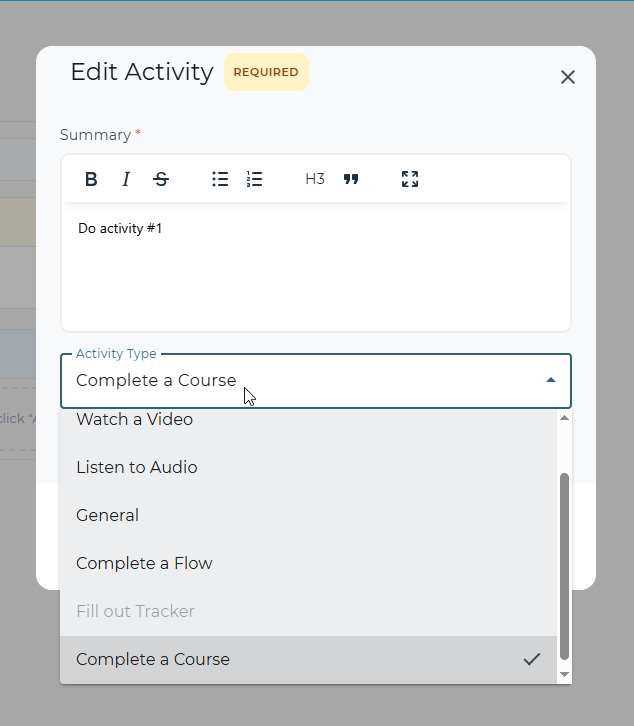
Phases in Habit Builders, Challenges, and Group Programs already provide the option to hold articles, videos, and trackers. Now they can hold a full course, too. "Complete a Course" joins the lineup as the eighth activity type. Admins can drop any course from the portal's library into a phase, and it works like everything else there: trackable, completable, and reportable, with no separate instructions and no manual follow-up.
What's New
"Complete a Course," Right in the Program Designer
"Complete a Course" now appears in the activity type list. Admins choose from the portal's own course list, which includes both the calendar-based Living series and the newer self-paced courses.
You Decide What Counts as Done
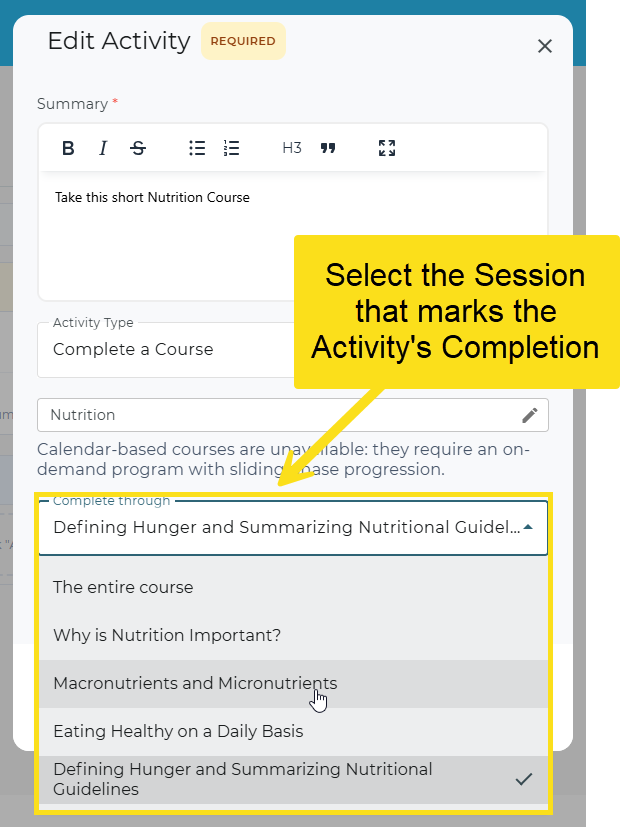
Once you pick a course, its sessions appear by name. Choose the session that marks the activity complete once a member finishes it. That lets you require the whole course or just part of it.
Guardrails at Setup and Publish
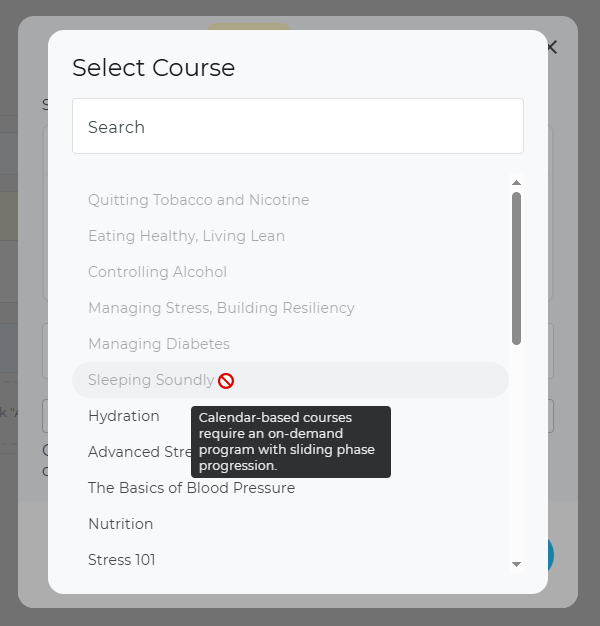
Calendar-based courses release on a fixed schedule, so they only work in on-demand programs with sliding phase progression. Courses that don't fit appear greyed out in the picker, with a tooltip explaining why. If one slips through anyway, publishing is blocked. Other publish-time checks (course not found, course disabled for the portal, no course selected) come back with a plain-language reason, so admins know the exact issue that is blocking publishing.
A Course Tile Members Can Read at a Glance
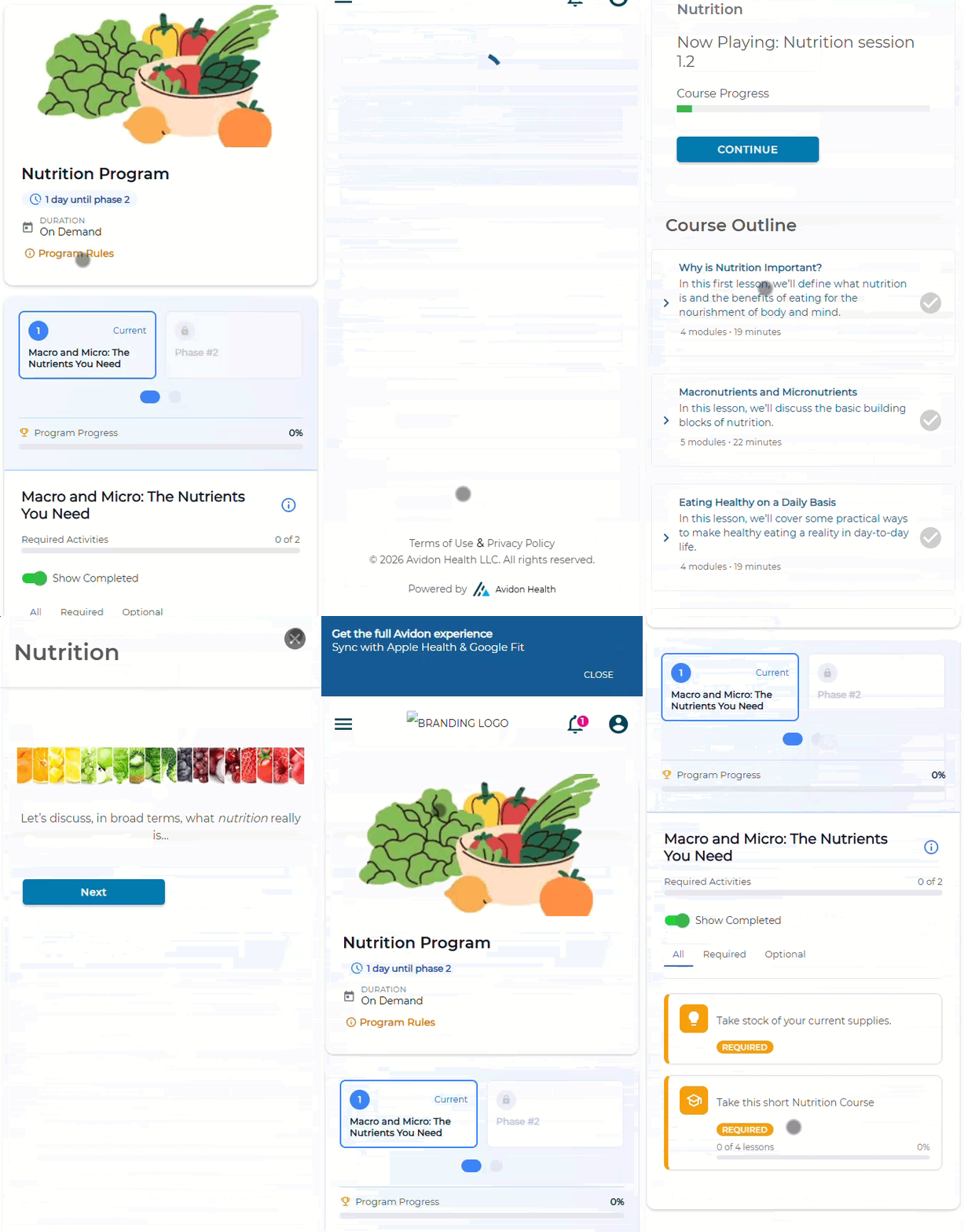
The activity shows up as a tile with a real progress bar ("5 of 10 lessons, 50%"). Clicking the tile opens the course directly, and a "Back to your program" button on the course page brings members right back to where they left off. The activity marks itself complete as soon as the course is finished, whether the member finishes it inside the program or somewhere else in the portal. Credit is retroactive, too: a member who finished the course months before joining the program gets credit right away.
Where It Appears
The current member portal gets the full experience, including launch and return. The new member site shows the tile, icon, and progress bar, with automatic completion working the same way; the tile isn't clickable there yet since that site doesn't have a course player. The admin customer-service view shows icon, label, and progress so support can see where a member stands.
Why It Matters, in a Nutshell
Completion that tracks itself—Whether members finish from inside the program or straight from the catalog, completion records automatically, so nobody has to chase down proof the work got done.
Retroactive credit—Members who already finished a course get credit the moment they join a program that includes it, with nothing to backfill by hand.
Retire the workarounds—Courses go into a phase like any other activity, so you can drop the "General" placeholder activities that used to stand in for them.
Built-in guardrails—Courses that won't work get caught before publishing, along with a clear explanation.
Visibility for support—Customer Service Admins can see a member's course progress right in the admin view, which means fewer back-and-forth questions about status.
Courses now work like every other activity in a program: add one to a phase, and it's tracked, credited, and completed automatically.
Managing Stress & Building Resiliency, Modernized From the Ground Up
Managing Stress & Building Resiliency (formerly LivingEasy) is the latest course to get the modernization treatment, following Eating Healthy, Living Lean and Quitting Tobacco & Nicotine. All 44 videos across its eight sessions are rebuilt: shorter, sharper, and rewritten with current language and the latest science. The goal of helping members handle pressure and bounce back stays the same; the course just gets there in a fresher way.
What's New
Shorter Videos Across the Board
Every video in all eight sessions is trimmed down to a set maximum length, so each one fits easily into a coffee break.
Updated Scripts
Every script is rewritten with current terminology and the latest research on stress and resilience, so the strategies speak directly to the pressures members face every day.
A Fresh Visual Experience
New imagery and an updated presentation style run through every video. They match the modern look of Avidon's other refreshed courses.
Why It Matters, in a Nutshell
Broad relevance—Stress touches nearly every employee, so a more watchable course pays off across your whole workforce.
Built to hold attention—Shorter, sharper videos are more likely to hold attention from start to finish, which helps more members complete the sessions.
A consistent library—The course now matches the production standard of Avidon's other modernized courses, so members get the same polished experience from one course to the next.
Zero effort on your end—The update rolls out automatically, with nothing to configure or announce.
This update makes one of Avidon's core courses look and sound as current as the strategies it teaches.
October's Autopilot Challenge: Autumn Movements & Moments
Registration is open now through October 11 | Challenge began on October 5 and runs for two weeks
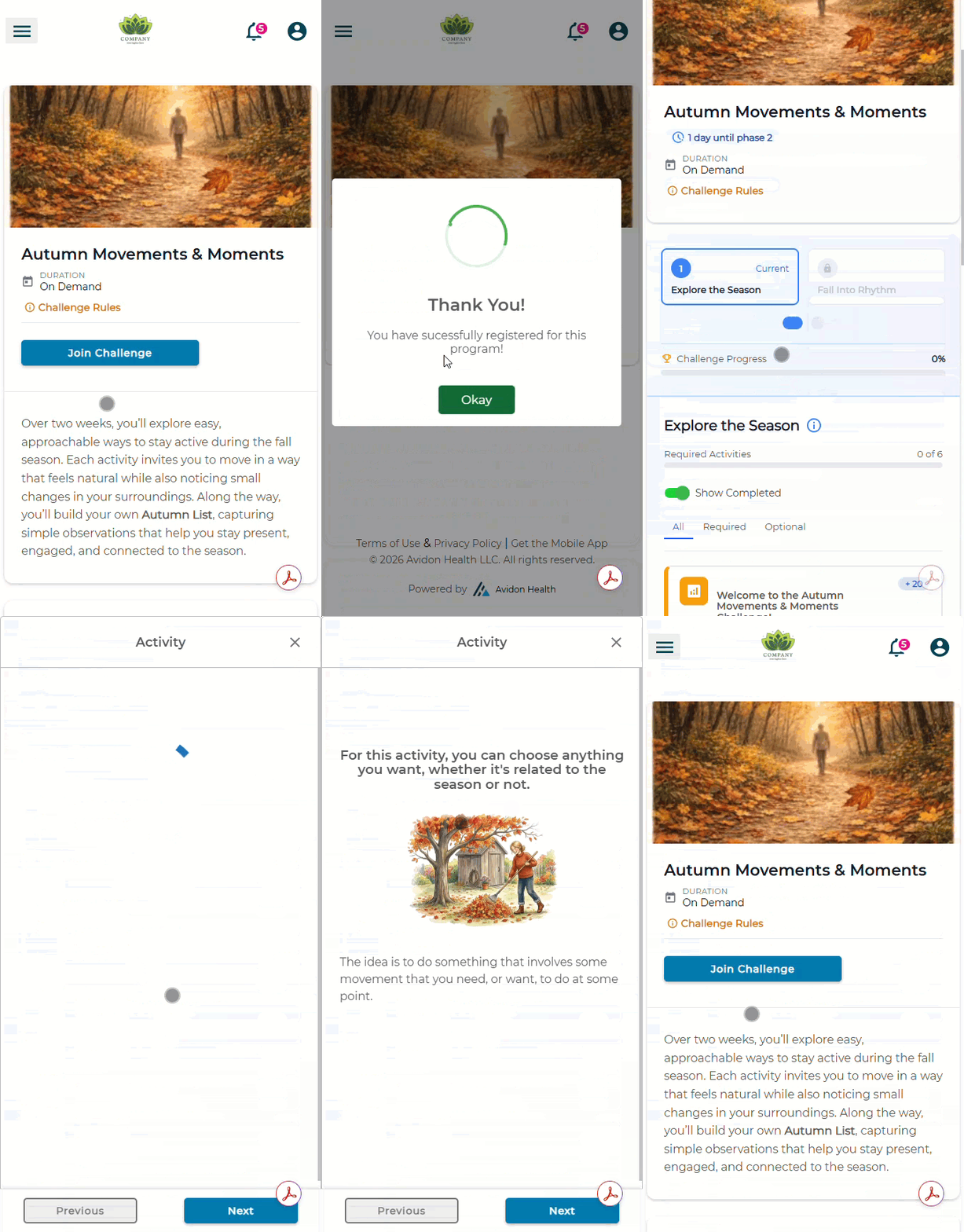
Autumn Movements & Moments is a two-week Challenge built on a reasonable premise: October is one of the better months to be outside, and moving through it can be invigorating and explorative. The Challenge centers on everyday motion, like fall walks, seasonal chores, and taking the long way home. Week 1 is about exploring and noticing. Week 2 is about settling into a rhythm that sticks. After each activity, participants add one small observation to their own Autumn List, building a running record of what they noticed while they were on the move.
Your 2027 Autopilot Calendar Is Set
The 2027 Challenge Autopilot lineup is final. Wherever possible, each month's topic lines up with a national health observance on the Society for Public Health Education (SOPHE) calendar, so your Challenges line up with the health conversations already happening that month. The lineup includes two topics that are brand new to Autopilot, Dental Care & Health and Eye Health. Sleep & Brain Health also gets expanded treatment, building on the sleep topics earlier Challenges have covered.
Here's the 2027 Lineup
January: Rest & Reset
February: The Heart & Longevity
March: Food Noise
April: Spring Cleaning
May: Emotional Awareness
June: Sleep & Brain Health
July: Sun & Skin Safety (& Hydration)
August: Organization & Time Management
September: Healthy Aging
October: Dental Care & Health
November: Eye Health
December: Reflection & Quietude
Communication is Key
Read the full article in the Product Communication Center, where you can also submit your thoughts and ideas.
If you want to learn more about Avidon Health, please visit our website. Want to reach out to our team of experts? Click here for our helpdesk.