- DATE:
- AUTHOR:
- The Avidon Health team

Introducing a Collection of Coaching & CMS Updates
This release brings enhancements across Coaching and the Content Management System, focused on making everyday workflows more efficient, personalized, and easier to manage. From streamlined assessment reviews and improved task visibility to expanded automation actions and smarter conditional logic, these updates give coaches and administrators greater control while delivering more dynamic, data-driven member experiences. Together, they reinforce a more flexible and efficient platform to support structured growth, actionable insights, and seamless content delivery.
Coaching Improvements & Updates
We’ve made additional enhancements to the Coaching platform to further streamline workflows and improve day-to-day usability for coaches and administrators.
Smarter Assessment Reviews & Improved Dialog Flexibility
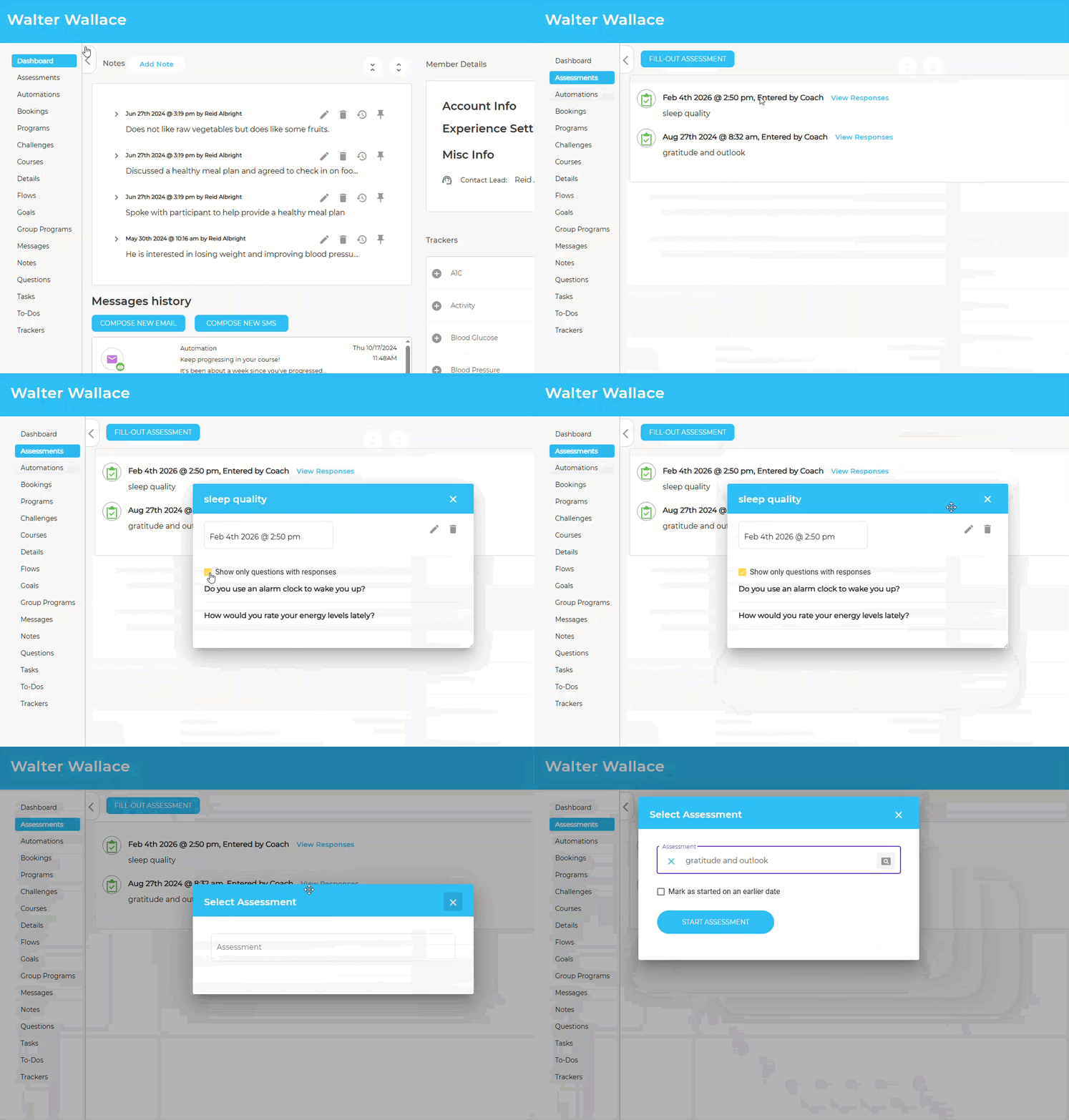
Branching Assessment reviews now include a condensed view that displays only the questions a participant actually answered. This reduces visual clutter from unused branches and makes responses faster and easier to review. Reviewers can still toggle back to the full view at any time. (This update applies to Assessments only and does not affect Flows.)
In the Member Admin, the “Start New” Assessment and Flow dialogs are now movable. Coaches can drag and reposition these windows during multi-step workflows, bringing them in line with existing view and edit dialogs for greater consistency and ease of use.
Expanded Task Visibility
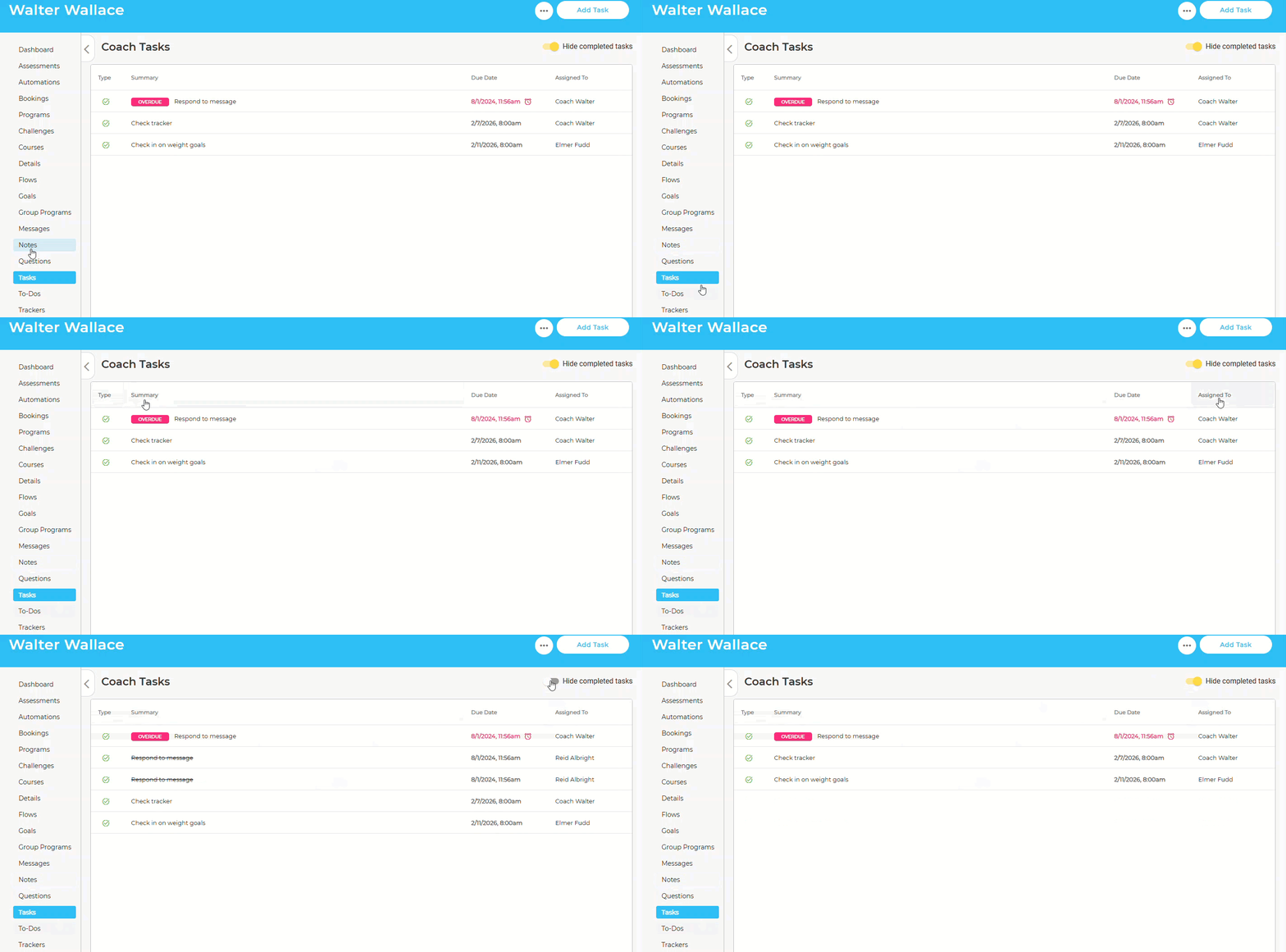
Coaching Dashboard: A new toggle allows coaches to view tasks completed within the past 30, 90, or 365 days, offering quick insight into recent engagement and follow-through. Completed tasks are clearly labeled with summary text and strikethrough styling for easy scanning.
New Tasks Tab in the Member Admin: A dedicated Tasks tab now centralizes coach-assigned tasks in one place. Coaches can see task type, ownership, and due dates at a glance, with a simple toggle to hide completed tasks and focus on what’s active.
Extended Coach Profile Management
Account managers can now view and manage key coach profile details displayed to end users, including display name, short bio, and profile image. This gives organizations greater control over how coaches are presented to members while maintaining clear separation between account-level administration and coaching responsibilities.
Together, these updates make coaching workflows more efficient, organized, and transparent across the platform.
Content Management System (CMS) Enhancements
We’ve expanded the flexibility and intelligence of the Content Management System with several powerful updates that give administrators more control, automation capabilities, and personalization options across the platform.
New Automation Action: Set Portal Group
Portal Groups can now be assigned directly within Flows and Automations using a new “Change Portal Group” action. This allows members to be automatically moved into a designated Portal Group when a trigger condition is met, streamlining segmentation and ensuring members see the right content and experience at the right time.
New Tracker Completion Type: Minimum Entries
A new Minimum Entries Completion option is now available for tracker activities within phases in Challenges, Group Programs, and Habit Builders.
Unlike Days Completion, which counts distinct days with activity, Entries Completion measures the total number of submissions, allowing multiple entries on the same day to contribute toward completion.
This provides more precise control over participation requirements, supporting goals such as completing an activity a specific number of times within a phase, regardless of how many days it spans.
New Flow Component: Journal Entry
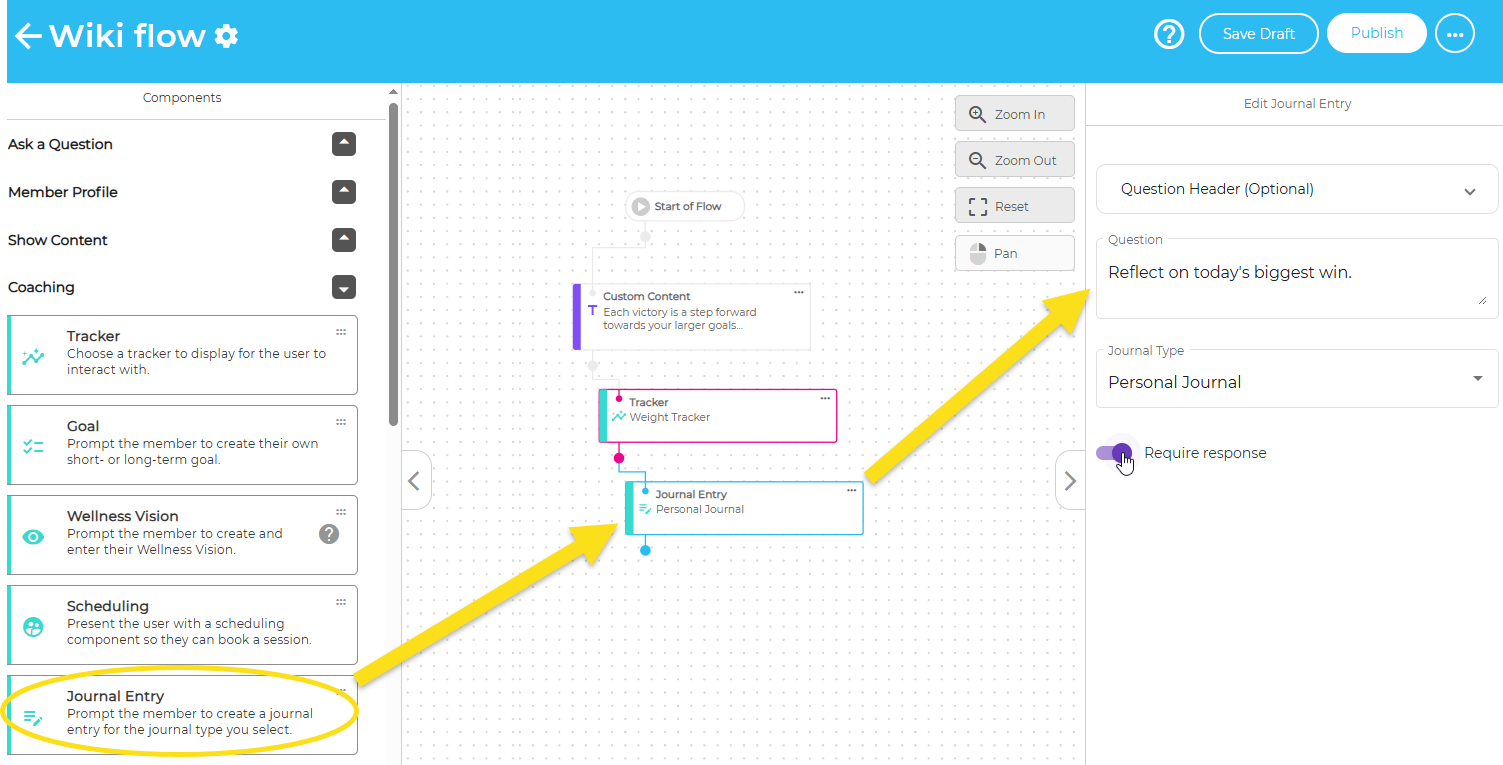
Flows can now include a Journal Entry component, giving members space for structured reflection as they move through an experience. When members reach this step, they’ll see the familiar journal editor (including rich text, emoji, and image upload where enabled), and their entry is saved directly to their journal.
Flow creators can:
Pre-populate a reflection prompt
Choose whether the journal step is required or optional
This enhancement makes reflection a more integrated part of guided experiences.
Tracker-Based Conditional Logic
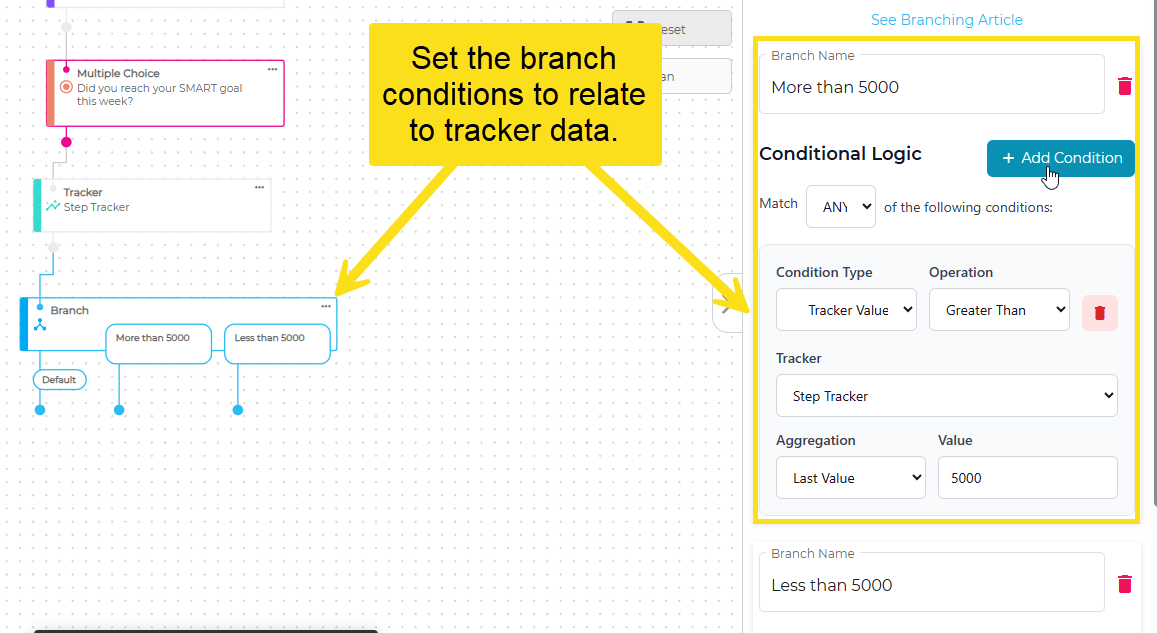
Admins can now use Tracker data (including weight, blood pressure, mood, or step count) when building conditional logic across the platform. Tracker-based conditions can be applied to:
Flow branching
Automation Start triggers
Recommendation Rules
Page Builder content
Conditions respect tracker-specific formats and measurement units, allowing dynamic personalization based on a member’s most recent data.
For example, a Flow can branch differently depending on whether a member’s daily step count is above or below 5,000 steps, tailoring guidance and next steps based on real behavior rather than static rules.
Other Updates
Data Processing System Enhancements
We’ve enhanced the Data Processing system to improve template flexibility, operational visibility, and alignment with portal-level profile rules. Updates include expanded profile field mapping, automated processing notifications, and improved handling of member data updates to ensure consistency and integrity.
Enhancements to Content Usage Reports
The Content Usage Report now includes unique viewer analytics and expanded reporting tools for deeper engagement insights. Admins can view ranked content by distinct viewers, explore full data sets, and export complete reports for more informed decision-making.
Communication is Key
Read the full article in the Product Communication Center, where you can also submit your thoughts and ideas.
If you want to learn more about Avidon Health, please visit our website. Want to reach out to our team of experts? Click here for our helpdesk.